Key Takeaways
- Website architecture is simply how your pages are sorted, named, and linked.
- Crawlers follow links, so a messy layout means missed pages.
- Keep important pages about three clicks from the homepage.
- Pillars, clusters, and internal links give your SEO site structure a backbone.
- Clean URLs, plain menus, breadcrumbs, and sitemaps do the unglamorous work.
- Audit every quarter for orphan pages and broken links.
Picture walking into a huge store where nothing has a sign. You’d give up fast, right? Google’s crawlers do something similar when a site has no clear layout, and visitors just close the tab. The good news is that fixing it doesn’t take wizardry. It takes a plan. Here’s how website architecture works and how to get yours in shape.
What is Website Architecture?

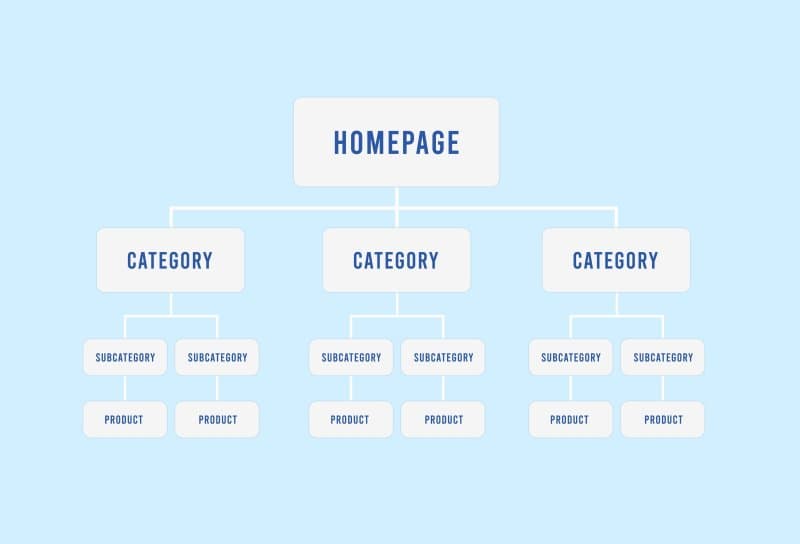
Website architecture is how your pages are arranged and connected. Your homepage sits at the top, categories branch off it, and individual pages live under those. Links tie it all together. Some folks just say site structure, and that works too. The point of website architecture SEO is simple: nobody, human or bot, should ever hit a dead end.
Why is Website Structure Important for SEO?
Website structure SEO isn’t just a technical chore. It changes how Google reads your site and how people move through it. Three things stand out, and each one feeds back into rankings in its own way. Let’s take them in order.
1. Crawlers Need a Trail
Google mostly finds pages by following links. Bury a page five clicks down, or link to it from nowhere, and a crawler may never show up. No crawl, no index. No index, no ranking. A connected structure leaves a trail, and more of your content gets seen.
2. Links Carry Authority
Your homepage usually earns the most backlinks, and it can pass a share of that strength along through internal links. Point it toward the pages you care about. Anchor text matters here too, because it tells search engines what the destination page is about before they even visit it.
3. People Hate Hunting
Nobody enjoys digging for a page. If your menu confuses them, they bounce, plain and simple. Logical categories and a tidy menu send visitors toward what they came for. Happier visitors tend to stick around and buy, which quietly helps your SEO too.
Must Read: What is a Sitemap? A Simple Guide to Types, Uses, and Setup
What Does a Good Site Architecture Look Like?
Honestly, it looks a bit boring, and that’s a compliment. Everything has a home. Nothing’s hidden. Strong sites tend to be flat, grouped by topic, and free of stranded pages. Here’s a quick comparison of a flat layout and a deep one, so you can see the gap.
| Feature | Flat Structure | Deep Structure |
| Clicks from homepage | Three or fewer | Often five or more |
| Crawling | Bots reach pages quickly | Bots may skip buried pages |
| Authority flow | Reaches most pages | Fades before reaching deep pages |
| User experience | Easy to browse | Frustrating to explore |
Group Related Pages
Keep pages about the same subject close together. If you sell running shoes, one category should hold the guides, reviews, and product pages. That grouping tells search engines these pages belong together, and over time it helps your site look like a real authority on the topic.
Rescue Your Orphan Pages
An orphan page has zero internal links pointing at it. Crawlers can’t follow a link that doesn’t exist, and visitors only land there if they know the exact address. Hunt these down every so often, then link each one from a page that actually makes sense.
How Does Website Architecture Affect SEO?
The impact shows up in four places: crawling, indexing, rankings, and how visitors behave. A messy layout causes slow, quiet damage you rarely notice until traffic dips. This table matches common structure problems with the trouble they cause down the line.
| Structure Problem | SEO Effect |
| Pages buried deep | Slower discovery and weaker authority |
| Orphan pages | Missed by crawlers, rarely indexed |
| Random categories | Unclear topic signals |
| Messy URLs | Harder to understand the hierarchy |
| Broken internal links | Wasted crawl effort and poor experience |
Crawl budget plays a part, too. Big sites only get so much of Google’s attention, and wasteful paths burn through it. Cleaner paths mean Google spends its visits on pages that actually earn you something.
Website Architecture Best Practices for SEO
Ready to build or repair your layout? These website architecture best practices suit blogs, stores, and service sites alike. Don’t try to do everything in one weekend. Start with the first two, then work down the list as your site grows.
1. Plan Pillars and Clusters
Choose a few broad topics for pillar pages, then back each one with narrower cluster pages. Link the clusters up to the pillar and the pillar back down. You end up with an SEO site structure where every page has a job, and nothing floats off alone.
2. Keep Click Depth Shallow
Try to keep important pages within three clicks of the homepage. Shorter paths help crawlers and people alike. If something’s buried, link to it from a category page, a related post, or the main menu, whichever fits. Don’t make anyone dig for your best stuff.
3. Write Clean URLs
Short URLs that mirror your categories make the hierarchy obvious, like /shoes/running/trail-shoes. Stick to lowercase, hyphens, and your main keyword. Keep the pattern consistent as you grow, and add redirects if a live address ever has to change. It’s a small habit that saves headaches.
4. Simplify Menus and Breadcrumbs
Your menu should show the main categories without overwhelming anyone. Save drop-downs for sites with lots of sections. Breadcrumbs help too, since they show visitors where they are and give search engines another look at your hierarchy. Whatever you choose, make sure the links are plain HTML.
5. Use Sitemaps, Then Audit
An XML sitemap lists the pages you want crawled, while an HTML sitemap rescues people who get lost. Check both every few months. Look for orphan pages, broken links, and redirect chains, and fix what you find so the structure stays clean as you publish.
Top Pick: How Does robots.txt Work? SEO Best Practices You Can Follow
Conclusion
Good website architecture won’t win any beauty contests, but it works quietly in the background. Crawlers find your pages, internal links share authority, and visitors know where to click. Start small. Map your topics, shorten the click paths, and rescue any orphans. Then check again every quarter, because sites drift.
Frequently Asked Questions
How many clicks should any page be from the homepage?
Aim for three clicks or fewer for important pages. Shallow paths help crawlers reach content faster and keep visitors from giving up. Huge sites may occasionally need a few more clicks, which is fine.
Is website architecture the same as navigation?
No. Navigation is one visible part of it. Website architecture also covers URL patterns, internal links, categories, and page hierarchy, including connections visitors never notice but crawlers follow every time they visit.
Do small websites need a planned structure?
Yes, even a ten-page site benefits. Planning early prevents messy categories later. It’s far easier to start with clear groups and links than to untangle hundreds of pages after the site has grown.
Can changing my structure hurt existing rankings?
It can, if you move pages carelessly. Changing URLs without redirects breaks old links and loses authority. Plan changes carefully, use 301 redirects, update internal links, and monitor Search Console closely afterward.
Which tools can find orphan pages?
Site auditing tools such as Semrush Site Audit or Screaming Frog can flag orphan pages. Compare your sitemap with crawl results, then link any missing pages from relevant content so crawlers can reach them.